
Showing posts with label inkscape. Show all posts

Thursday, July 17, 2014

The Belle of the Ball

I've been busy though my blog might not show it! So I will try to share a few of my projects from the past few weeks. These paper dolls have been one of my favorite new designs.

I was asked if I could adapt a ballerina design for a debutante event. So, I was excited to work something fresh. This adaptation would make them standing and could be used as place card holders.

 On my solid color dresses, I alternate the embossed panels with a plain one for contrast and texture.


 I figured I would eventually have someone want some guys to go with the gals so I created a basic fella to accompany the lovely ladies!


 My Paris themed dolls have been very popular


Sunday, February 5, 2012

Using Inkscape 0.48 Filters


If you've been to the Inkscape Cutting Design forum, you'll see we've been experimenting with some of Inkscape's filters. If you haven't explored these options in 0.48 you'll have to make some time to do so.


As we have discovered it's easy to forget which ones you've used especially if you are layering textures on one another and changing colors can change the effect, too.

So here, I've tried to show the steps I've taken to get to the effect shown above.


I started with a solid purple and have selected just the swirl design to use with the filter effect.


In the Filters drop down menu under Textures I selected the Tinted rainbow effect

In this image I layered the 3d wood from the Materials in the Filter menu.


Also note at the bottom of the filters drop down menu is a Remove Filters feature to undo the applied filters. This works better than the Undo button especially if you have multiple filter layers.


The only change in the above samples is the background colors. Below I created a border (see my previous post for instructions on doing that) and I changed the color on the other elements to a softer pink tone which pops against the black border.


The samples below are other colors and filters I've played with and the files below are available to Inkscape Cutting Design forum members. Check out the Geisha Girl, Flamenco Dancer and Bollywood Dancer posts in the free svg files for more filter inspirations! Have fun!


Photobucket


Wednesday, January 25, 2012

Inkscape Tutorial for creating a frame or border around a saying.


Many of us like the welded letters and framing around words and sayings and I've been asked how to accomplish this using Inkscape. So I'll try to explain the steps I use to do this.

For this tutorial I'll use the phrase Baby Shower.


After selecting the font you want (this one is Curlz MT)
Path > Object to Path
Object >Ungroup

Use the Arrow Keys to connect letters


In my final version. I enlarged the first letter of each word. (I use the ctrl button to maintain proportion.) I also lengthened the lower serif on the H so it wouldn't be too close to the O.
I used the Edit path by node tool to select the two nodes on the lower serif of the H to extend it and create addtional space between letters
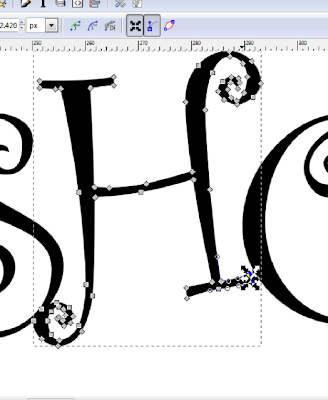
When satisfied with your tweaks, select all the letters
Path > Union
Path > Outset


As you can see, using Outset was too much weight so
Edit > Undo
Zoom in
Path > Dynamic Offset

Using dynamic offset gives one node that can be used to add weight in a more controlled fashion but I usually zoom in to see it better.
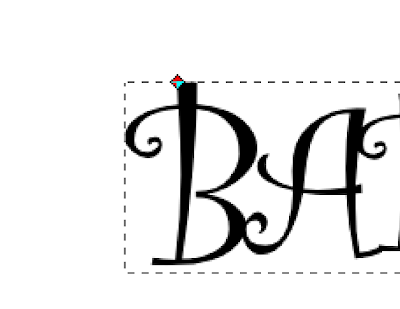


Move node by small increments until you're happy with the letters
(save your file)
Path > Object to Path


Now we want to create the frame so
Edit > Duplicate
Change color of duplicate and move.
Select your original image
Path > Dynamic Offset
You can also use Outset and keep selecting it until it has enough weight. I move the duplicate up to see if I like the size of the border.
Once I'm happy with it then
Path > Object to Path


I don't want the extra white spaces in the black frame so I'll edit the nodes and eliminate them.

If you feel ambitious and want an additional layer duplicate the lettering



Path > Outset
Path > Object to Path


Hope this helps those new to Inkscape to create their own special headlines!


By the way this file is here, seventh post!

Tuesday, January 24, 2012

Hatching in Inkscape...still


Some techniques are fun to experiment with and the hatching option using the Calligraphy tool allows for a wide variety of effects. I've discussed how to do this technique in a post from May 2011 on Hatching. In the middled samples I've overlayed the two top designs, one using the Tremor option. There is Wiggle, too. Try different settings and play with it. The speed you use drawing over the letter or image will also affect it. In these sample I duplicated my letter and applied union to the lines and used the Difference option to create a different look from my previous samples

Monday, January 23, 2012

2012 Calendar - February


Well, in the February calendar I experimented with the hatching feature again in Inkscape and will try to post some new examples in using the Calligraphy tool to create a variety of effects.

Friday, January 20, 2012

Life is fragile, Handle with Prayer

I couldn't settle on one design so made several...zip file available with png files, individual as well as a full page. Files here...


Friday, January 13, 2012

Another day in paradise


Well here are a couple of other options for the paradise heading...files in fourth post.

Sunday, January 8, 2012

Paradise


A request for the phrase paradise, incorporated the palm tree in the lettering...in Sayings and Phrases_2

Friday, January 6, 2012

Owl Always Love You

Well, I haven't done that phrase yet but playing with my swirly owl design so here's another idea...


In these samples below I took my owl in Inkscape and in the Objects > Pattern > Objects to Pattern to create my own custom fill for the letters...whoo doesn't love that!! Whoo Hooo!


And speaking of things I love here is a great link to a printable 2012 calendar for all of you Owl Lovers!


Owl Lover 2012 Calendar

Wednesday, January 4, 2012

Thinking of You and Memories


Here are a couple of sayings you might have a use for...files here!

Photobucket

